Qmapi Developer Documentation
Welcome to the comprehensive guide for integrating Qmapi into your applications. This documentation provides detailed instructions for setup, configuration, and API usage to help you get started quickly and efficiently.
Overview
Qmapi is a powerful API solution designed to streamline survey operations through an efficient observer-based configuration system. Our platform provides robust integration capabilities for survey management and data collection, enabling developers to build sophisticated survey applications with ease.
High Performance
Optimized for speed and reliability with minimal latency for real-time survey operations.
Secure
Enterprise-grade security features with SHA-256 encryption and secure token validation.
Global Reach
Distributed infrastructure with country-specific filtering for targeted survey campaigns.
Flexible Integration
Seamless integration with your existing systems through standardized RESTful API endpoints.
Quick Start Guide
1. Authentication Setup
To get started with Qmapi API, you'll need to obtain your unique API key and hash key from your account dashboard. These credentials will be used for all API requests.
2. Basic Request Format
curl -X GET "https://api.qmapi.com/api/v2/survey" \
    -H "Authorization: Bearer YOUR_API_KEY" \
    -H "Content-Type: application/json"
3. Response Format
{
    "survey_id": 60920424,
    "loi": 20,
    "ir": 20,
    "cpi": 4.2,
    "livelink": "https://api.qmapi.com/api/v2/survey/redirect/60920424?SupplyID=[%SupplyID%]&PNID=[%AID%]&SessionID=[%sessionID%]&TID=[%TokenID%]"
}
Survey API
The Survey API enables seamless integration of survey functionality into your applications by providing access to active surveys and their detailed information. You can refine your results by appending attributes such as age, gender, and other demographic qualifiers.
Survey Questions Format
"questions": [
  { "Question_ID": 21, "value": 23 },
  { "Question_ID": 22, "value": 1 }
]
Retrieving Active Surveys
Use the following endpoint to retrieve active surveys:
GET https://api.qmapi.com/api/v2/survey

// Example Response
{
    "survey_id": 60920424,
    "loi": 20,
    "ir": 20,
    "cpi": 4.2,
    "livelink": "https://api.qmapi.com/api/v2/survey/redirect/60920424?SupplyID=[%SupplyID%]&PNID=[%AID%]&SessionID=[%sessionID%]&TID=[%TokenID%]"
}
Query Parameters
You can add query parameters to the base URL https://api.qmapi.com/api/v1/survey to filter surveys based on specific criteria.
| Parameter | Description | Example |
|---|---|---|
limit |
Maximum number of surveys to return (defaults to 200) | ?limit=50 |
country |
Filter surveys by country code (ISO 2-letter code) | ?country=US or ?country=IN |
exactcpi |
Filter surveys by exact cost-per-interview value | ?exactcpi=4.2 |
loi |
Filter surveys by length of interview (in minutes) | ?loi=15 |
ir |
Filter surveys by incidence rate percentage | ?ir=20 |
Example Usage
// Get up to 50 surveys from the US with a LOI of 10 minutes
GET https://api.qmapi.com/api/v1/survey?limit=50&country=US&loi=10Security & Authentication
Token-Based Authentication
Qmapi API uses SHA-256 Base64 encryption for secure authentication. Follow these steps to generate a valid authentication token:
- Extract the survey ID and parameters from the livelink URL
- Perform SHA-256 Base64 encryption using your Secret Hash Key
- URL-encode the resulting hash value
- Use the encoded hash as the Token ID (TID) parameter
Hashing Process
From the provided livelink URL, extract the required parameters:
https://api.qmapi.com/api/v2/survey/redirect/59722755?SupplyID=[%SupplyID%]&PNID=[%AID%]&SessionID=[%sessionID%]&TID=[%TokenID%]Using your Secret Hash Key, generate a SHA-256 Base64 hash:
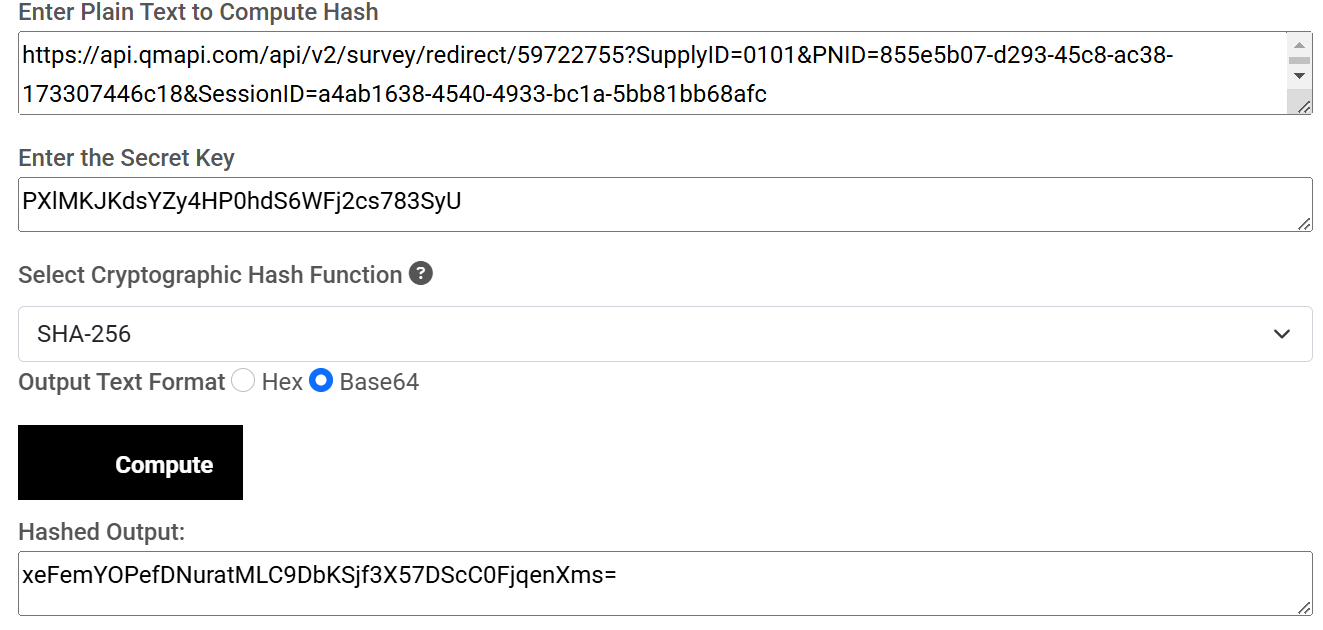
Then, encode the hash value by replacing these characters:
+with%2B/with%2F=with%3D
The encoded value becomes your TID parameter:

Final URL Example
After properly implementing authentication, your final URL should look like this:

Integration Guide
Adding Qualification Data
When directing respondents to surveys, you can append qualification data to prescreen participants and improve matching:
https://api.qmapi.com/api/v2/survey/redirect/59722755?SupplyID=0101&PNID=855e5b07-d293-45c8-ac38-173307446c18&SessionID=a4ab1638-4540-4933-bcla-5bb81bb68afc&TID=xeFemYOPefDNuratMLC9DbKSjf3X57DScC0FjqenXms%3D&questions=[{Question_ID:21,value:23},{Question_ID:22,value:1}]Common Question IDs
| Question_ID | Description | Values |
|---|---|---|
| 21 | Age | Age in years (e.g., 23) |
| 22 | Gender | 1 = Male, 2 = Female, 3 = Other |
Code Examples
const crypto = require('crypto');
const axios = require('axios');

// Your API credentials
const API_KEY = 'your_api_key';
const HASH_KEY = 'your_hash_key';

// Function to generate authentication token
function generateToken(supplyID, pnid, sessionID) {
  const dataToHash = `${supplyID}${pnid}${sessionID}${HASH_KEY}`;
  const hash = crypto.createHash('sha256')
    .update(dataToHash)
    .digest('base64');

  // URL encode the hash
  return hash.replace(/\+/g, '%2B')
    .replace(/\//g, '%2F')
    .replace(/=/g, '%3D');
}

// Function to get available surveys
async function getSurveys(country = 'US', limit = 50) {
  try {
    const response = await axios.get(
      `https://api.qmapi.com/api/v2/survey?country=${country}&limit=${limit}`,
      {
        headers: {
          'Authorization': `Bearer ${API_KEY}`,
          'Content-Type': 'application/json'
        }
      }
    );
    return response.data;
  } catch (error) {
    console.error('Error fetching surveys:', error);
    return null;
  }
}

// Usage example
(async () => {
  const surveys = await getSurveys();
  console.log(surveys);

  // Generate survey link with token
  if (surveys && surveys.length > 0) {
    const survey = surveys[0];
    const supplyID = '0101';
    const pnid = '855e5b07-d293-45c8-ac38-173307446c18';
    const sessionID = `session-${Date.now()}`;
    const token = generateToken(supplyID, pnid, sessionID);

    // Build the final URL
    const surveyUrl = `${survey.livelink.replace('[%SupplyID%]', supplyID)
      .replace('[%AID%]', pnid)
      .replace('[%sessionID%]', sessionID)
      .replace('[%TokenID%]', token)}`;

    console.log('Survey URL:', surveyUrl);
  }
})();import requests
import hashlib
import base64
import urllib.parse
import json
# Your API credentials
API_KEY = "your_api_key"
HASH_KEY = "your_hash_key"
# Function to generate authentication token
def generate_token(supply_id, pnid, session_id):
data_to_hash = f"{supply_id}{pnid}{session_id}{HASH_KEY}"
hash_bytes = hashlib.sha256(data_to_hash.encode()).digest()
hash_b64 = base64.b64encode(hash_bytes).decode()
# URL encode the hash
return hash_b64.replace('+', '%2B').replace('/', '%2F').replace('=', '%3D')
# Function to get available surveys
def get_surveys(country='US', limit=50):
try:
response = requests.get(
f"https://api.qmapi.com/api/v2/survey?country={country}&limit={limit}",
headers={
"Authorization": f"Bearer {API_KEY}",
"Content-Type": "application/json"
}
)
return response.json()
except Exception as e:
print(f"Error fetching surveys: {e}")
return None
# Function to build survey URL with qualification data
def build_survey_url(survey, supply_id, pnid, session_id, qualifications=None):
token = generate_token(supply_id, pnid, session_id)
# Start with base URL
url = survey["livelink"]
url = url.replace('[%SupplyID%]', supply_id)
url = url.replace('[%AID%]', pnid)
url = url.replace('[%sessionID%]', session_id)
url = url.replace('[%TokenID%]', token)
# Add qualification data if provided
if qualifications:
url += f"&questions={urllib.parse.quote(json.dumps(qualifications))}"
return url
# Usage example
if __name__ == "__main__":
surveys = get_surveys()
if surveys and len(surveys) > 0:
survey = surveys[0]
supply_id = "0101"
pnid = "855e5b07-d293-45c8-ac38-173307446c18"
session_id = "a4ab1638-4540-4933-bcla-5bb81bb68afc"
# Example qualification data
qualifications = [
{"Question_ID": 21, "value": 23},
{"Question_ID": 22, "value": 1}
]
survey_url = build_survey_url(survey, supply_id, pnid, session_id, qualifications)
print(f"Survey URL: {survey_url}")Frequently Asked Questions
What is the difference between IR and LOI parameters?
IR (Incidence Rate) is the percentage of people who qualify for a survey out of all who attempt to take it. LOI (Length of Interview) is the estimated time in minutes that a respondent will spend completing the survey.
How do I handle survey completion callbacks?
Qmapi can send completion notifications to a webhook URL that you specify in your account settings. These notifications include the survey ID, completion status, and respondent information.
What happens if there's an error in my authentication token?
If your authentication token is invalid, the API will return a 401 Unauthorized response. Double-check your hashing implementation and ensure you're correctly URL-encoding the hash value.
Can I test the API in a sandbox environment?
Yes, Qmapi provides a sandbox environment for testing your integration without affecting production data. Contact our support team to request sandbox credentials.
Need Help?
Our support team is ready to assist you with any questions or issues you may encounter during integration. Whether you need technical assistance, account help, or have questions about our API, we're here to help.